How To Backup And Restore Your Terraria Server
Updated September 24, 2026
Keeping regular backups of your Terraria server is a straightforward process that safeguards your world data. If something goes wrong, restoring from a backup lets you get back up and running quickly.
Important: Terraria stores player character data locally on each player's computer. This means server backups cannot be used to recover corrupted character files — only world data is included.
Backup Your Terraria Server
You can create a manual backup at any time directly from your control panel.
- Open your server control panel.
- In the left-hand sidebar, click the Backups tab.
- Click Create Backup.
- Give it a name, and if you want to exclude certain folders from being backed up, you can add them here.
- Choose whether to lock it or not and click Start Backup to start generating the backup.
Restore Your Terraria Server
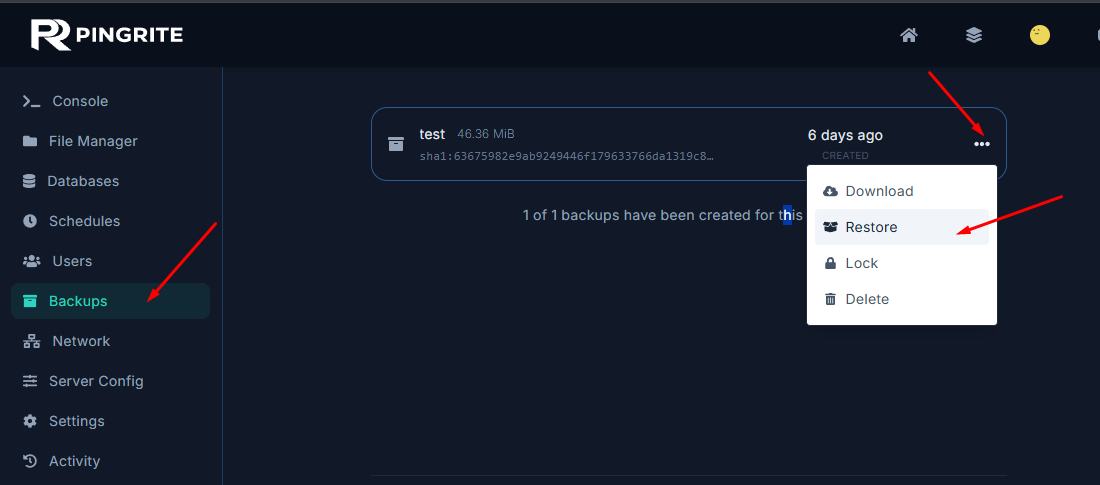
- Open your server control panel.
- In the left-hand sidebar, click the Backups tab.
- Click the three dots button ... on the left side of the backup you want to restore and select Restore from the menu.