
How To Find Your Steam Or Epic ID
Updated September 24, 2026
Many server management tasks — like whitelisting, banning, or adjusting permissions — require a player's unique ID. This guide walks you through finding both Steam and Epic Games IDs.
STEAM64ID
- Go to the SteamID website.
- Enter any one of the following for the player you're looking up:
- Steam username
- Steam profile URL
- SteamID
- SteamID3
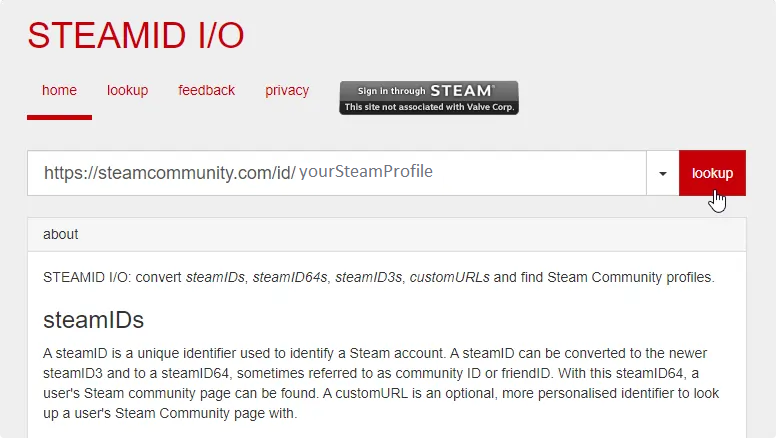
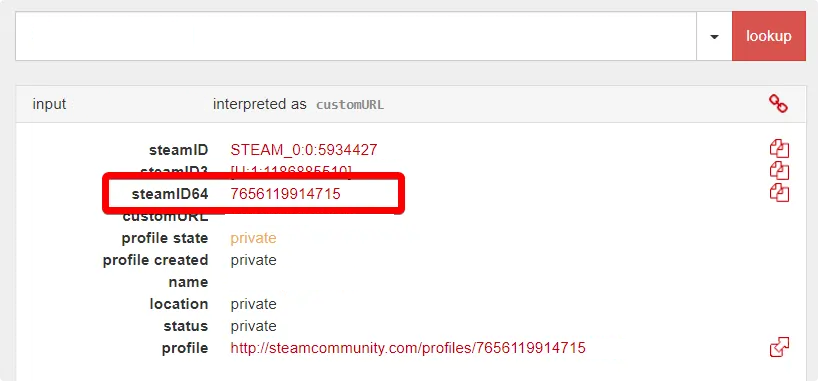
- Copy the steamID64 value from the results.
Epic Games ID (for ARK Servers)
- Open the Epic Games version of ARK and start a single-player game.
- Press TAB to open the console, type
admincheats listplayers, and hit ENTER. - Copy the ID that appears in the output.
Important: Epic Games users may have a different ID on each device they connect from. Since there's currently no way to verify Epic IDs, players might need to be whitelisted again if they switch devices.