Your Project Zomboid dedicated server is configured through the [servername].ini file, located in the /.cache/Server/ directory on your server. This guide covers every setting in the file, organized by category, so you know exactly what each option does and which ones are safe to change.
Important
Always stop your server before editing the .ini file. Some settings only take effect on a fresh restart, and editing while the server is running may cause your changes to be overwritten when the server saves.
How to Edit Your Server Settings
-
Log into your server control panel and Stop your server.
-
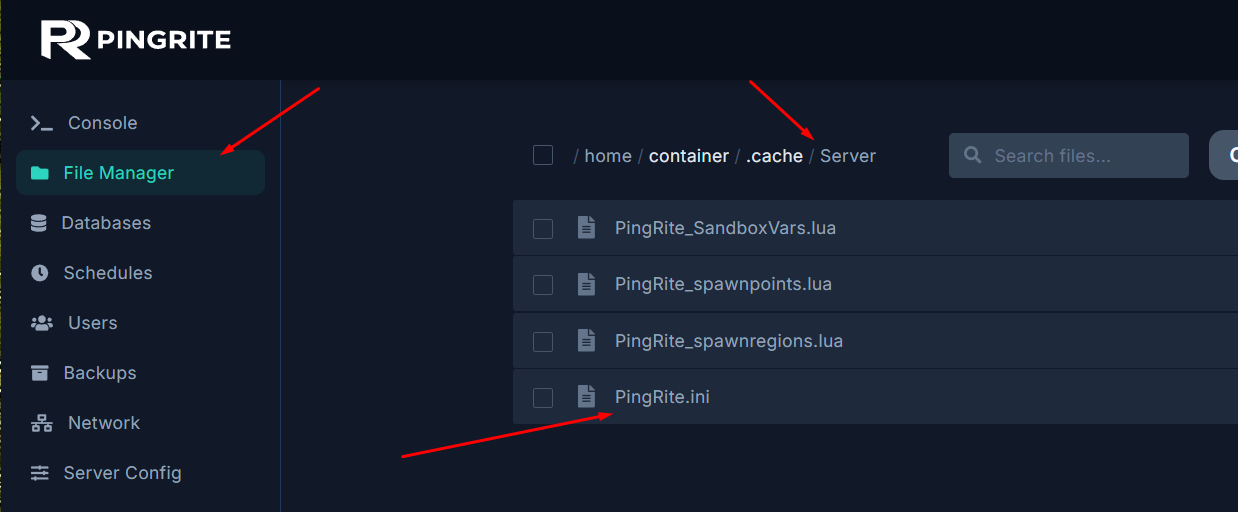
Navigate to File Manager and open /.cache/Server/.
-
Open the [servername].ini file — the filename matches your server name.
-
Make your changes, Save the file, and Start your server.
Server Identity & Visibility
These settings control how your server appears in the server browser and what players see when they connect.
| Setting |
Default |
Example |
Notes |
PublicName |
My PZ Server |
Survivors United PVE |
The server name shown in the in-game browser and Steam server list. Keep it under 64 characters. |
PublicDescription |
(empty) |
Friendly PVE server with mods |
Description displayed in the server browser. Use \n for line breaks. |
Public |
false |
true |
Whether the server appears in the in-game server browser. Steam-enabled servers are always visible in the Steam browser regardless of this setting. |
ServerWelcomeMessage |
(default welcome) |
Welcome! <LINE> Rules: no griefing |
Displayed in chat when a player joins. Supports <LINE> for line breaks and <RGB:r,g,b> for colors (values 0.0–1.0). |
Network & Ports
These settings control how players connect to your server. On a hosted panel like PingRite, port settings are typically pre-configured for you.
| Setting |
Default |
Example |
Notes |
DefaultPort |
|
DO NOT CHANGE this port. |
The main port used for player connections. |
UDPPort |
|
DO NOT CHANGE this port. |
Secondary UDP port, typically DefaultPort + 1. |
RCONPort |
|
DO NOT CHANGE this port. |
Port for Remote Console access. Only relevant if you use RCON tools for remote administration. |
RCONPassword |
(empty) |
MyStr0ngP@ss! |
Password for RCON access. Leave blank to disable RCON. Use a strong, unique password — anyone with this password has full server control. |
UPnP |
true |
false |
Attempts automatic port forwarding via UPnP. Not applicable on hosted servers — safe to leave at default. |
server_browser_announced_ip |
(empty) |
(leave empty) |
Only needed for multi-IP setups like server farms. Do not change unless you know your network configuration requires it. |
PingLimit |
400 |
800 |
Maximum allowed ping (ms) before a player is kicked. Set to 100 to disable the limit entirely. Increase if players with higher latency are being kicked unfairly. |
Access Control
These settings determine who can join your server and how accounts are managed.
| Setting |
Default |
Example |
Notes |
Open |
true |
false |
true = anyone can join and create an account. false = whitelist only (admins must manually create accounts). |
Password |
(empty) |
secretpass |
Players must enter this password to join. Leave empty for no password requirement. |
AutoCreateUserInWhiteList |
false |
true |
When Open=true, automatically adds joining players to the whitelist with their chosen username/password. |
MaxPlayers |
32 |
16 |
Maximum concurrent players (admins bypass this limit). Values above 32 may cause poor map streaming and desync. |
MaxAccountsPerUser |
0 |
3 |
Limits accounts per Steam user. 0 = unlimited. Useful to prevent alt-account abuse. |
AllowCoop |
true |
true |
Whether splitscreen/co-op players can join. |
AllowNonAsciiUsername |
false |
true |
Allow non-ASCII characters (e.g., Cyrillic) in usernames. |
DropOffWhiteListAfterDeath |
false |
true |
Removes a player from the whitelist when they die. On Open=false servers, this prevents them from creating a new character without admin approval. |
LoginQueueEnabled |
false |
true |
Enables a login queue when the server is full, instead of immediately rejecting players. |
LoginQueueConnectTimeout |
60 |
120 |
Seconds before a queued player's connection times out. Range: 20–1200. |
DenyLoginOnOverloadedServer |
true |
true |
Prevents new logins when the server is under heavy load. |
Recommended Configurations
- Public server:
Open=true, set a Password, AutoCreateUserInWhiteList=true
- Private friends server:
Open=false, manually whitelist trusted players
- Open community server:
Open=true, no password, MaxAccountsPerUser=1
PVP & Safety System
These settings control player-versus-player combat and the opt-in safety system.
| Setting |
Default |
Example |
Notes |
PVP |
true |
false |
Master toggle for PVP. When false, players cannot damage each other at all. |
SafetySystem |
true |
true |
Allows players to individually toggle PVP mode. A player can only be hurt when at least one participant has PVP enabled (skull icon visible). Set to false to allow free-for-all PVP at all times. |
ShowSafety |
true |
true |
Displays a skull icon above the heads of players who have entered PVP mode. |
SafetyToggleTimer |
2 |
5 |
Seconds it takes to enter or leave PVP mode. Range: 0–1000. |
SafetyCooldownTimer |
3 |
30 |
Seconds before a player can toggle PVP mode again after switching. Increase to prevent PVP toggling abuse. |
PVPMeleeDamageModifier |
30.0 |
50.0 |
Damage multiplier for PVP melee attacks. Range: 0.00–500.00. Higher = more deadly. |
PVPFirearmDamageModifier |
50.0 |
70.0 |
Damage multiplier for PVP ranged attacks. Range: 0.00–500.00. |
PVPMeleeWhileHitReaction |
false |
true |
Whether a player can counter-attack while in a hit reaction animation. |
PlayerBumpPlayer |
false |
true |
Whether running through other players knocks them over. |
KnockedDownAllowed |
true |
true |
Whether players can be knocked down. |
Player Display & Visibility
| Setting |
Default |
Example |
Notes |
DisplayUserName |
true |
false |
Shows usernames above players' heads. Disable for a more immersive or hardcore experience. |
ShowFirstAndLastName |
false |
true |
Shows the character's first and last name instead of (or in addition to) the username. |
MouseOverToSeeDisplayName |
true |
false |
When true, names only appear when you mouse over a player. |
HidePlayersBehindYou |
true |
true |
Automatically hides players outside your field of view, similar to how zombies work. |
SneakModeHideFromOtherPlayers |
true |
true |
Players in sneak mode become less visible to other players. |
MapRemotePlayerVisibility |
1 |
3 |
Who appears on the in-game map. 1 = hidden, 2 = friends only, 3 = everyone. |
Chat & Communication
| Setting |
Default |
Example |
Notes |
GlobalChat |
true |
false |
Enables or disables the /all global chat channel. Disable for immersive roleplay servers. |
ChatStreams |
s,r,a,w,y,sh,f,all |
(do not change) |
Do not modify. Defines available chat channels internally. Changing this can break chat functionality. |
VoiceEnable |
true |
false |
Enables or disables in-game VOIP. |
VoiceMinDistance |
10.0 |
10.0 |
Minimum tile distance for VOIP. Voices at full volume within this range. |
VoiceMaxDistance |
100.0 |
50.0 |
Maximum tile distance for VOIP. Voices fade to silence beyond this range. Lower for more realistic proximity chat. |
Voice3D |
true |
true |
Enables directional audio for VOIP — voices come from the speaker's direction. |
Discord Integration
Forward in-game global chat to a Discord channel and vice versa.
| Setting |
Default |
Example |
Notes |
DiscordEnable |
false |
true |
Enables Discord chat integration. |
DiscordToken |
(empty) |
(your bot token) |
Your Discord bot access token. Keep this secret. |
DiscordChannel |
(empty) |
zomboid-chat |
The Discord channel name to bridge chat with. Use DiscordChannelID if this doesn't work. |
DiscordChannelID |
(empty) |
123456789012345678 |
The numeric channel ID. More reliable than the channel name. |
Gameplay Settings
| Setting |
Default |
Example |
Notes |
PauseEmpty |
true |
true |
Pauses the game world when no players are online. Recommended for most servers to save resources and prevent time progression while empty. |
SpawnPoint |
0,0,0 |
10548,9612,0 |
Forces all new players to spawn at specific coordinates. Leave as 0,0,0 to use the default random spawn. Find coordinates at map.projectzomboid.com. |
SpawnItems |
(empty) |
Base.Axe,Base.Bag_BigHikingBag |
Items given to new players on spawn. Use internal item IDs separated by commas. |
MinutesPerPage |
1.0 |
0.5 |
Real-time minutes to read one page of a skill book. Lower values speed up learning. Range: 0.00–60.00. |
NoFire |
false |
true |
Disables all fire spread except campfires. Enable to prevent accidental or griefed building fires. |
AnnounceDeath |
false |
true |
Broadcasts a global chat message when any player dies. |
BanKickGlobalSound |
true |
false |
Plays a global sound when a player is banned or kicked. |
Sleep Settings
| Setting |
Default |
Example |
Notes |
SleepAllowed |
false |
true |
Allows players to sleep when tired. When false, the sleep mechanic is completely disabled. |
SleepNeeded |
false |
true |
Players must sleep or suffer penalties. Only works when SleepAllowed=true. |
FastForwardMultiplier |
40.0 |
20.0 |
Speed multiplier for time during sleep. Higher = faster sleep. Range: 1.00–100.00. |
Respawn Settings
| Setting |
Default |
Example |
Notes |
PlayerRespawnWithSelf |
false |
true |
Allows players to respawn at their death location. |
PlayerRespawnWithOther |
false |
true |
Allows players to respawn at a splitscreen or Remote Play partner's location. |
Loot Respawn
| Setting |
Default |
Example |
Notes |
HoursForLootRespawn |
0 |
720 |
In-game hours before looted containers respawn loot. 0 = disabled. A container must have been looted at least once to respawn. |
MaxItemsForLootRespawn |
4 |
4 |
Containers with this many or more items will not respawn loot. Prevents overfilling already-stocked containers. |
ConstructionPreventsLootRespawn |
true |
true |
Loot will not respawn in buildings players have barricaded or built in. |
Safehouse Settings
Safehouses allow players to claim and protect buildings. Both settings below must be configured — PlayerSafehouse for regular players and AdminSafehouse for admins.
| Setting |
Default |
Example |
Notes |
PlayerSafehouse |
false |
true |
Allows regular players to claim safehouses. |
AdminSafehouse |
false |
true |
Allows admins to claim safehouses. |
SafehouseAllowTrepass |
true |
false |
Whether non-members can enter a safehouse. Set to false for fully locked-down bases. |
SafehouseAllowFire |
true |
false |
Whether fire can damage safehouses. Disable to prevent griefing via fire. |
SafehouseAllowLoot |
true |
false |
Whether non-members can take items from a safehouse. |
SafehouseAllowRespawn |
false |
true |
Whether players respawn inside their safehouse after death. |
SafehouseDaySurvivedToClaim |
0 |
3 |
In-game days a player must survive before claiming a safehouse. Set to 3–7 to prevent new players from immediately locking down prime buildings. |
SafeHouseRemovalTime |
144 |
72 |
Real-world hours of inactivity before a player loses their safehouse claim. 144 = 6 days. |
SafehouseAllowNonResidential |
false |
true |
Whether non-residential buildings (shops, warehouses, etc.) can be claimed as safehouses. |
DisableSafehouseWhenPlayerConnected |
false |
true |
When true, safehouse protections are disabled while a member is online — it acts like a normal building. Protections only apply when all members are offline. |
Faction Settings
| Setting |
Default |
Example |
Notes |
Faction |
true |
true |
Whether players can create factions. |
FactionDaySurvivedToCreate |
0 |
5 |
In-game days survived before a player can create a faction. |
FactionPlayersRequiredForTag |
1 |
3 |
Minimum members needed before the faction owner can create a group tag. |
Destruction & Vehicles
| Setting |
Default |
Example |
Notes |
AllowDestructionBySledgehammer |
true |
false |
Whether players can destroy world objects with sledgehammers. Disable to prevent base raiding. |
SledgehammerOnlyInSafehouse |
false |
true |
Restricts sledgehammer destruction to inside the player's own safehouse. Requires AllowDestructionBySledgehammer=true. |
CarEngineAttractionModifier |
0.5 |
0.3 |
Multiplier for how far car engine noise attracts zombies. Lower values reduce zombie attraction and can help with server performance. Range: 0.00–10.00. |
SpeedLimit |
70.0 |
70.0 |
Maximum vehicle speed. Range: 10.00–150.00. |
World Cleanup
| Setting |
Default |
Example |
Notes |
BloodSplatLifespanDays |
0 |
7 |
Days before blood splats are removed when chunks load. 0 = never removed. Lowering this can help with performance on long-running servers. |
RemovePlayerCorpsesOnCorpseRemoval |
false |
true |
Whether player corpses are also removed when the corpse removal timer triggers. |
TrashDeleteAll |
false |
true |
Enables the "delete all" button on trash bins for players. |
| Setting |
Default |
Example |
Notes |
SaveWorldEveryMinutes |
0 |
10 |
How often the map is saved in real-world minutes. 0 = only saved when clients leave a loaded area. Set to 5–10 for regular saves without excessive lag spikes. |
BackupsCount |
5 |
10 |
Number of backup copies to keep. Range: 1–300. |
BackupsOnStart |
false |
true |
Create a backup every time the server starts. |
BackupsOnVersionChange |
true |
true |
Create a backup when the game version changes. Strongly recommended to keep enabled. |
BackupsPeriod |
0 |
120 |
Minutes between periodic backups. 0 = disabled. Set to 60–120 for regular backups on active servers. |
Steam & Anti-Cheat
| Setting |
Default |
Example |
Notes |
DoLuaChecksum |
true |
true |
Kicks clients whose game files don't match the server's. Prevents modified clients. Recommended to keep enabled. |
SteamVAC |
true |
true |
Enables Steam's Valve Anti-Cheat system. Recommended to keep enabled. |
SteamScoreboard |
true |
admin |
Show Steam usernames and avatars in the Players list. true = everyone, false = no one, admin = admins only. |
KickFastPlayers |
false |
false |
Kicks players moving faster than should be possible. May cause false positives — use with caution. |
Anti-Cheat Protection Types
The server includes 24 anti-cheat protection types (AntiCheatProtectionType1 through AntiCheatProtectionType24), all enabled by default. These detect various forms of cheating such as teleporting, speed hacks, and inventory manipulation. Keep all of these enabled unless you have a specific reason to disable one (e.g., a mod conflict). Several types also have threshold multipliers (Types 2, 3, 4, 9, 15, 20, 22, 24) that control sensitivity — increase the multiplier if you get false positives, but avoid lowering them below default.
Radio & Staff Settings
These settings control whether staff members with specific access levels can use in-game radio transmissions.
| Setting |
Default |
Notes |
DisableRadioStaff |
false |
Disables radio for all staff with any access level. |
DisableRadioAdmin |
true |
Disables radio for players with admin access level. |
DisableRadioGM |
true |
Disables radio for players with GM access level. |
DisableRadioOverseer |
false |
Disables radio for players with overseer access level. |
DisableRadioModerator |
false |
Disables radio for players with moderator access level. |
DisableRadioInvisible |
true |
Disables radio for invisible (hidden) players. |
Logging
These settings control what gets written to the server's log files.
| Setting |
Default |
Notes |
PerkLogs |
true |
Tracks player perk/skill level changes in PerkLog.txt. Useful for detecting XP exploits. |
ClientCommandFilter |
-vehicle.*;+vehicle.damageWindow;... |
Semicolon-separated list controlling which commands are logged. Prefix with - to exclude, + to include, and * as wildcard. Defaults filter out noisy vehicle commands while keeping important ones. |
ClientActionLogs |
ISEnterVehicle;ISExitVehicle;... |
Semicolon-separated list of player actions to log in ClientActionLogs.txt. |
Mods & Maps
Important
Changing mod or map settings incorrectly can prevent your server from starting or cause players to be unable to connect. Always back up your server before making changes. For a detailed guide on adding mods, see our How to Add Mods to Your Project Zomboid Server article.
| Setting |
Default |
Example |
Notes |
WorkshopItems |
(empty) |
2818847163;2392709985 |
Steam Workshop mod IDs separated by semicolons with no spaces. Incorrect formatting will prevent mod downloads. |
Mods |
(empty) |
ModName1;ModName2 |
Mod folder names separated by semicolons. Must match the exact names found in each mod's info.txt file. |
Map |
Muldraugh, KY |
Muldraugh, KY;MyCustomMap |
Active maps. The default map should always be listed first. Add custom map folder names after a semicolon. Changing this can reset your world. |
Settings You Should Not Change
The following settings are managed internally by the server. Changing them can cause character data loss, world corruption, or unexpected behavior.
| Setting |
Default |
Reason |
ResetID |
(auto-generated) |
Changing this forces all players to create new characters. This value is updated automatically during server soft-resets. Only modify it intentionally when wiping character data. |
ServerPlayerID |
(auto-generated) |
Identifies which server a character belongs to. Changing this also forces new character creation. Works in conjunction with ResetID. |
ChatStreams |
s,r,a,w,y,sh,f,all |
Internal chat channel routing. Changing this can break the chat system entirely. |
ItemNumbersLimitPerContainer |
0 |
Limits items per container including individual small items (e.g., only 50 nails total). 0 = no limit. Changing this to a low value will create frustrating gameplay. Only modify if you have a specific reason. |
Quick Reference: Common Server Setups
Casual PVE Server
PVP=false
Open=true
MaxPlayers=16
SleepAllowed=true
PlayerSafehouse=true
SafehouseAllowRespawn=true
NoFire=true
AnnounceDeath=true
PauseEmpty=true
Hardcore PVP Server
PVP=true
SafetySystem=false
Open=true
Password=yourpassword
MaxPlayers=32
PlayerSafehouse=true
SafehouseAllowTrepass=false
SafehouseAllowLoot=false
SafehouseDaySurvivedToClaim=3
DropOffWhiteListAfterDeath=false
AnnounceDeath=true
Private Friends Server
Open=false
Public=false
MaxPlayers=8
PVP=false
PlayerSafehouse=true
VoiceEnable=true
SleepAllowed=true
SleepNeeded=false
PauseEmpty=true
